Choosing accounting software is one of the most important technology decisions a business owner can make. The right platform doesn’t just record transactions—it helps you understand your cash flow, automate repetitive tasks, stay tax compliant, and make smarter financial decisions.
Among the dozens of accounting solutions available today, QuickBooks and FreshBooks remain two of the most recognizable names. Both are cloud-based platforms trusted by millions of businesses worldwide, yet they take noticeably different approaches to bookkeeping and financial management.
QuickBooks is widely regarded as an all-in-one accounting solution capable of supporting businesses from startup to enterprise. FreshBooks, on the other hand, has built its reputation around simplicity, invoicing, time tracking, and helping freelancers and service-based businesses get paid faster.
At first glance, the two platforms appear similar. They both allow you to create invoices, track expenses, connect your bank account, and generate financial reports. However, once you begin using them daily, the differences become much more apparent.
So, which accounting software offers better value in 2026?
In this comprehensive comparison, we’ll evaluate both platforms across pricing, features, ease of use, automation, reporting, integrations, customer support, scalability, and industry-specific use cases to help you make an informed decision.
QuickBooks vs FreshBooks at a Glance
| Feature | QuickBooks | FreshBooks |
|---|---|---|
| Best For | Small to medium businesses | Freelancers and service businesses |
| Ease of Use | Very Good | Excellent |
| Invoicing | Excellent | Excellent |
| Expense Tracking | Excellent | Excellent |
| Inventory Management | Advanced | Basic |
| Reporting | Extensive | Good |
| Payroll | Built-in (selected regions) | Via integrations |
| Project Management | Good | Excellent |
| Integrations | 750+ | 100+ |
| Mobile App | Excellent | Excellent |
| Scalability | Excellent | Moderate |
While both platforms overlap in many areas, their strengths serve different audiences.
QuickBooks Overview
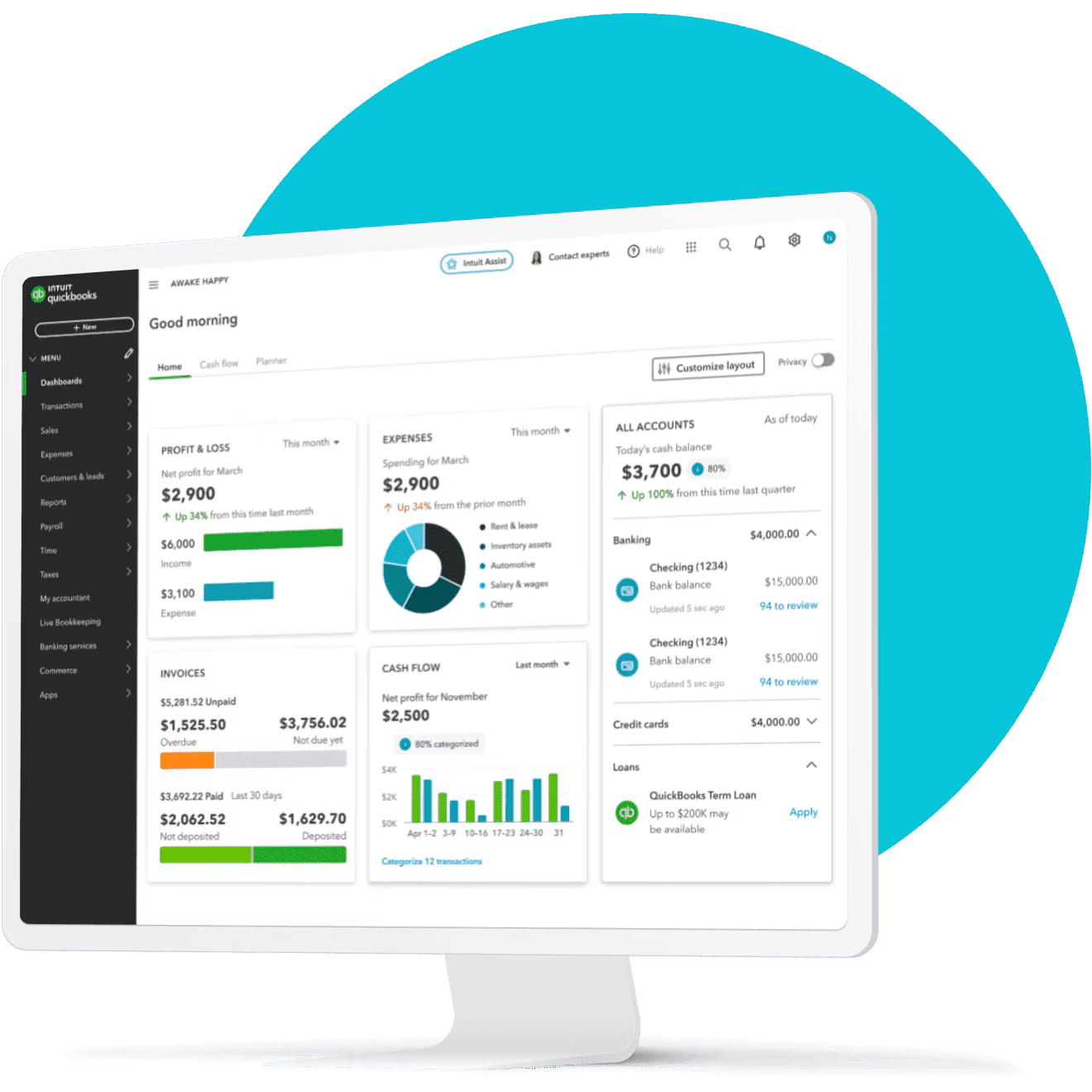
QuickBooks has been one of the leading accounting software solutions for decades. Developed by Intuit, it has evolved from desktop software into a powerful cloud accounting platform used by millions of businesses worldwide.
Today, QuickBooks Online supports everything from simple bookkeeping to advanced financial reporting, inventory management, payroll, sales tax, budgeting, and cash flow forecasting.
Many accountants recommend QuickBooks because of its extensive reporting capabilities and widespread adoption, making it easier to collaborate with finance professionals.
QuickBooks is particularly suitable for:
- Small businesses
- Growing companies
- Retail stores
- Ecommerce businesses
- Construction companies
- Manufacturing firms
- Professional service businesses
- Companies with multiple employees
FreshBooks Overview
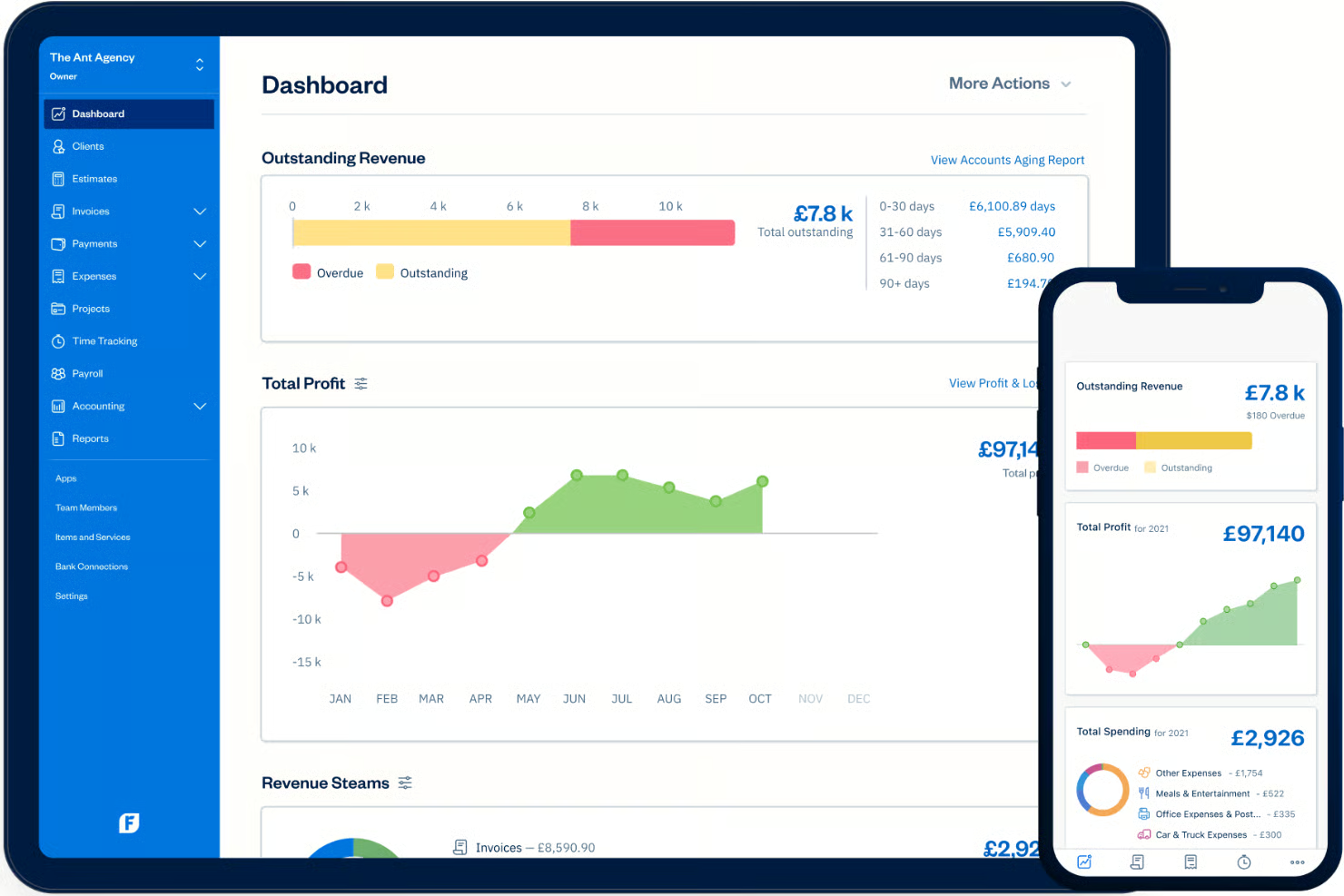
FreshBooks started as an invoicing solution for freelancers before expanding into a full cloud accounting platform.
Although it now includes bookkeeping, expense tracking, project management, estimates, proposals, and reporting, its strongest focus remains helping service businesses manage clients efficiently.
Unlike QuickBooks, FreshBooks emphasizes simplicity over complexity.
Its interface is clean, intuitive, and easy to learn, making it an attractive choice for business owners without an accounting background.
FreshBooks is especially popular among:
- Freelancers
- Consultants
- Marketing agencies
- Designers
- Photographers
- Lawyers
- Coaches
- Small service businesses
Features Comparison
Both platforms cover the core functions expected from modern accounting software, but the depth of those features differs considerably.
Invoicing
If invoicing is your highest priority, you’ll be pleased with either platform.
QuickBooks enables users to:
- Create branded invoices
- Accept online payments
- Set recurring invoices
- Schedule payment reminders
- Track invoice status
- Create estimates
- Convert estimates into invoices
FreshBooks offers similar capabilities while placing greater emphasis on user experience.
Additional FreshBooks invoicing features include:
- Late payment reminders
- Automatic late fees
- Deposit requests
- Client portals
- Recurring retainers
- Proposal generation
For consultants and agencies that bill clients regularly, FreshBooks provides one of the smoothest invoicing experiences available.
Winner: FreshBooks (for service businesses)
Expense Tracking
Expense management is another area where both applications perform well.
QuickBooks automatically imports bank transactions and categorizes expenses using intelligent suggestions. Users can attach receipts, manage vendors, and prepare records for tax season with minimal manual work.
FreshBooks also supports receipt scanning, expense categorization, and bank synchronization. The workflow is straightforward and ideal for solo business owners who want to minimize administrative tasks.
QuickBooks, however, offers more advanced accounting controls and customization for businesses with larger transaction volumes.
Winner: QuickBooks
Bank Reconciliation
Both platforms automatically import transactions from connected financial institutions.
QuickBooks provides more advanced reconciliation options for businesses handling thousands of monthly transactions.
FreshBooks focuses on simplicity, making reconciliation easy enough for users with little accounting knowledge.
For growing companies with complex finances, QuickBooks has the advantage.
Winner: QuickBooks
Financial Reporting
Reporting is one of the biggest differences between the two platforms.
QuickBooks includes a wide range of financial reports, such as:
- Profit & Loss
- Balance Sheet
- Cash Flow Statement
- General Ledger
- Budget Reports
- Sales Reports
- Tax Reports
- Inventory Reports
- Job Costing Reports
Businesses can also customize reports to fit their operational needs.
FreshBooks includes essential reports like:
- Profit & Loss
- Expense Reports
- Sales Tax Summary
- Accounts Aging
- Invoice Details
- Payment Reports
While these reports are sufficient for many freelancers and consultants, businesses requiring detailed financial analysis may find them limiting.
Winner: QuickBooks
Project Management
FreshBooks shines when it comes to managing client work.
Users can:
- Track project profitability
- Monitor billable hours
- Collaborate with team members
- Share files
- Track project budgets
- Invoice directly from tracked time
QuickBooks includes project tracking but doesn’t offer the same polished workflow for client-based businesses.
Winner: FreshBooks
Inventory Management
Inventory is an area where QuickBooks clearly leads.
Businesses can:
- Track inventory quantities
- Monitor inventory valuation
- Generate inventory reports
- Manage purchase orders
- Monitor stock levels
FreshBooks offers only basic inventory capabilities, making it less suitable for retailers or ecommerce businesses with extensive product catalogs.
Winner: QuickBooks
Pricing Comparison (2026)
Pricing is often one of the deciding factors when choosing accounting software.
Both QuickBooks and FreshBooks offer multiple subscription tiers that scale with your business. While exact pricing varies by country and promotional offers, their overall positioning remains consistent.
QuickBooks
QuickBooks offers plans designed for businesses ranging from sole proprietors to larger organizations. As you move up the pricing tiers, you gain access to advanced reporting, inventory management, budgeting, project profitability tracking, payroll options (in supported regions), and enhanced automation.
Its higher-tier plans are particularly attractive for businesses expecting to grow, as they reduce the need to migrate to another accounting platform later.
FreshBooks
FreshBooks structures its pricing around the number of billable clients and the needs of service-based professionals.
Even the entry-level plans include robust invoicing tools, expense tracking, time tracking, and client management. Higher plans unlock features such as team collaboration, advanced reporting, project profitability, and more automation.
For freelancers and consultants, FreshBooks often delivers excellent value because many of its core strengths are available without requiring an expensive subscription.
Ease of Use and User Experience
When comparing QuickBooks vs FreshBooks, features and pricing are important, but they do not tell the whole story.
The software you choose will become part of your everyday business routine. You may use it to create invoices, record expenses, check whether clients have paid, review reports, track billable hours, or reconcile your accounts. If those basic tasks feel unnecessarily complicated, even a powerful accounting platform can become frustrating.
This is where QuickBooks and FreshBooks take noticeably different approaches.
FreshBooks generally feels more approachable for freelancers, consultants, agencies, and service-based businesses that primarily need invoicing, expense tracking, payments, and time tracking. QuickBooks, on the other hand, offers a broader accounting environment designed to handle more complex business operations as the company grows.
QuickBooks User Experience
QuickBooks has a lot going on.
That can be a strength, but it can also make the platform feel more complicated when you first start using it.
The reason is simple: QuickBooks is not just an invoicing application. Depending on the plan, you can use it for income and expense tracking, financial reporting, inventory, project profitability, time tracking, payroll-related workflows, bills, payments, and other accounting tasks.
For example, QuickBooks Online Plus and Advanced can track inventory, purchase orders, vendors and related product information. QuickBooks also provides inventory reporting and low-stock alerts on supported plans.
That broader functionality means there is more to learn.
For a business owner who has never used accounting software before, the number of menus, settings and accounting terminology can initially feel like a lot. However, once the account is configured properly, the additional functionality becomes much more useful.
Another area where QuickBooks has improved is automation. The platform can connect with bank accounts and other apps, automate bookkeeping-related tasks, handle invoices and payments, and provide financial reports from the same system.
FreshBooks User Experience
FreshBooks takes a different approach.
The platform is built around making common small-business tasks relatively straightforward, particularly invoicing, client management, expenses and time tracking.
This becomes obvious when you look at how FreshBooks connects time and expenses to invoices. You can track billable time and expenses and then use that information when preparing invoices for clients.
For a freelancer or service provider, that workflow makes a lot of sense.
Imagine you are a web designer working on several client projects. You may not need advanced inventory management or complicated accounting workflows. What you probably care about is knowing how much time you spent on each project, recording expenses, sending professional invoices and getting paid.
FreshBooks is particularly well suited to that type of workflow.
Its 2026 updates also continue to focus on areas such as invoices, estimates, proposals, expenses, projects and time tracking.
Which Is Easier for Beginners?
If your definition of “easy to use” is getting invoices out quickly and managing basic client finances, I would give FreshBooks the advantage.
If your definition is having everything you need to manage increasingly complex business finances in one place, QuickBooks becomes more attractive.
This distinction is important because a platform can be easier to use precisely because it does less.
FreshBooks does not need to expose every accounting feature to a freelancer who only wants to bill clients and track expenses. QuickBooks has to provide a much broader accounting toolkit, so there is naturally more complexity.
QuickBooks vs FreshBooks for Invoicing
Both platforms are strong for invoicing, but FreshBooks has a particularly strong focus on the client-billing experience.
FreshBooks allows businesses to create professional invoices and connect tracked time and expenses to those invoices.
QuickBooks also provides invoicing and payment tools, and Intuit continues to expand its payment workflows. For example, a 2026 QuickBooks update introduced the ability for customers to select and pay multiple unpaid invoices from the checkout page.
So I would not say QuickBooks has poor invoicing. It doesn’t.
The difference is that FreshBooks feels more invoice-first, while QuickBooks feels more accounting-first.
QuickBooks vs FreshBooks for Time Tracking
This is another area where FreshBooks has an advantage for service businesses.
FreshBooks allows users to track time using a timer or manually enter time. Entries can also be marked as billable and later used for client billing.
QuickBooks also supports time tracking. QuickBooks Online Essentials, Plus and Advanced include basic time tracking that can be used for projects and billable hours.
However, businesses that want more advanced workforce and time-management capabilities can also use QuickBooks Time, which adds features such as employee time tracking, scheduling and GPS-related functionality.
Therefore, FreshBooks is simpler for straightforward billable-hour tracking, while QuickBooks offers a broader ecosystem for businesses that need more advanced workforce management.
Ease of Use Winner: FreshBooks
Winner: FreshBooks
FreshBooks gets the win here because its core workflow is easier to understand, particularly for freelancers and service-based businesses.
QuickBooks is not difficult once you become familiar with it, but it has a much larger accounting feature set. That makes it the better long-term choice for some businesses, but not necessarily the easiest starting point.
QuickBooks vs FreshBooks: Which Is Better for Your Business?
There is no universal winner in the QuickBooks vs FreshBooks debate.
The better choice depends heavily on what your business actually does.
A freelancer with five recurring clients has very different accounting requirements from a company with employees, inventory, multiple projects and more complicated financial reporting.
Here is how I would break it down.
FreshBooks for Freelancers
FreshBooks is one of the better choices for freelancers who mainly need to manage clients, invoices, expenses and billable time.
This is where its straightforward workflow becomes valuable.
If your business involves consulting, writing, design, marketing, photography, web development, coaching or another service-based profession, you are likely to spend more time thinking about clients and projects than inventory.
FreshBooks lets you track time, record expenses and turn that information into invoices.
That makes it particularly appealing to people who do not want their accounting software to feel like a full financial management system.
Best choice for freelancers: FreshBooks
QuickBooks for Growing Small Businesses
Once a business starts becoming more complicated, QuickBooks becomes increasingly attractive.
For example, a growing company may need better financial reporting, inventory management, project profitability tracking, vendor management, payroll integrations or more advanced accounting workflows.
QuickBooks Online provides tools for tracking inventory, products, vendors, purchase orders and project profitability on supported plans.
This is where QuickBooks’ additional complexity starts making sense.
Instead of moving to another accounting platform as your company grows, you may be able to move to a higher QuickBooks plan and continue using the same ecosystem.
Best choice for growing businesses: QuickBooks
FreshBooks for Service-Based Businesses
If your company sells time and expertise rather than physical products, FreshBooks deserves serious consideration.
An agency, consultant, designer, freelancer or professional service provider may care more about:
- Client management
- Time tracking
- Billable hours
- Estimates
- Invoicing
- Expenses
- Online payments
- Project-related workflows
FreshBooks is designed around many of these activities.
The ability to connect tracked time and expenses with invoices is particularly useful when clients are billed according to the work performed.
Best choice for service businesses: FreshBooks
QuickBooks for Businesses With Inventory
This is one of the clearest reasons to choose QuickBooks.
Inventory management is available in QuickBooks Online Plus and Advanced, where businesses can track products, quantities, purchase orders and other inventory information.
If you sell physical products, inventory can quickly become an important part of your accounting workflow.
You need to know what you have in stock, what you have purchased, what you have sold and when you need to reorder.
QuickBooks is better positioned for this type of business.
Best choice for inventory-based businesses: QuickBooks
QuickBooks for Businesses That Need More Advanced Accounting
The larger and more complicated your company becomes, the more important the accounting side of the software becomes.
This is where QuickBooks generally pulls ahead.
It provides a broader set of accounting, reporting, inventory, project and business-management capabilities than the typical freelancer needs. That can make QuickBooks excessive for a one-person business, but useful for a company with more complicated financial requirements.
QuickBooks vs FreshBooks for Small Businesses
For a very small business, I would not automatically recommend QuickBooks simply because it has more features.
More features do not always equal better software.
If you are a one-person business sending invoices to clients and tracking a relatively small number of expenses, FreshBooks may provide everything you actually need without the additional complexity.
But if you expect the business to grow into a larger operation with employees, inventory, more detailed reporting or more complex accounting requirements, QuickBooks may be the better investment.
My Recommendation by Business Type
| Business type | My pick | Why |
|---|---|---|
| Freelancer | FreshBooks | Simple invoicing and time tracking |
| Consultant | FreshBooks | Strong client and billable-time workflow |
| Creative professional | FreshBooks | Easy client billing |
| Small agency | FreshBooks | Useful project/time workflows |
| Retail business | QuickBooks | Stronger inventory capabilities |
| Product-based business | QuickBooks | Better inventory and accounting depth |
| Growing small business | QuickBooks | More room to scale |
| Business with complex accounting | QuickBooks | Broader accounting functionality |
| Business focused mainly on invoicing | FreshBooks | Simple billing workflow |
The important thing is not to choose the software with the longest feature list.
Choose the software that matches the way your business actually operates.
QuickBooks vs FreshBooks: Pros and Cons
Before making the final decision, it is worth stepping back and looking at what each platform does well and where it falls short.
QuickBooks Pros
1. More comprehensive accounting features
QuickBooks is the stronger choice if you want more than basic invoicing and expense tracking. It provides a broader accounting environment for businesses with more complex requirements.
2. Strong inventory capabilities
QuickBooks Online Plus and Advanced support inventory tracking, purchase orders, product management and related reporting.
3. Better scalability
A business can start with relatively straightforward accounting requirements and move toward more advanced plans as its needs increase.
4. Strong reporting
QuickBooks provides a broad selection of financial and business reports, including profitability and inventory-related reporting on supported plans.
5. Large ecosystem
QuickBooks connects with banks and other business applications, allowing businesses to build a wider financial workflow around the platform.
QuickBooks Cons
1. Can feel overwhelming
The large number of features can make QuickBooks feel more complicated than necessary for someone who simply wants to send invoices and track expenses.
2. Some useful features require higher plans or add-ons
This is something to pay attention to when comparing prices. The cheapest QuickBooks plan does not necessarily provide every feature a growing business may eventually need.
3. Not necessarily the best choice for very simple businesses
If you are a freelancer with a small client list, you may not need the full accounting depth QuickBooks provides.
FreshBooks Pros
1. Easy to understand
FreshBooks focuses heavily on the everyday financial tasks that service businesses perform.
2. Excellent invoicing workflow
Creating professional invoices and connecting time and expenses to client billing are among its strongest use cases.
3. Strong time tracking
FreshBooks allows users to track time using timers or manual entries and mark time as billable.
4. Great for freelancers and service providers
The platform’s workflow makes particular sense for businesses that sell services rather than physical products.
5. Less intimidating for new users
If you are not an accountant, FreshBooks can be easier to approach because you can focus on the financial tasks that matter most to your business.
FreshBooks Cons
1. Not as comprehensive as QuickBooks
If your business requires advanced accounting, inventory or more complex business-management capabilities, QuickBooks is generally the stronger option.
2. Can become less attractive as your business gets more complicated
A platform that is perfect for a freelancer may not be the best platform once the business develops more complex financial requirements.
3. Pricing needs to be considered alongside client and user limits
It is important to look beyond the headline monthly price. FreshBooks’ plans differ in areas such as billable clients and users, so the cheapest plan is not necessarily the cheapest option for every business. Current pricing and plan details should be checked before subscribing.
Quick Comparison
| QuickBooks | FreshBooks | |
|---|---|---|
| Ease of use | Good | Excellent |
| Invoicing | Excellent | Excellent |
| Time tracking | Excellent | Excellent |
| Accounting depth | Excellent | Good |
| Inventory | Excellent | Limited compared with QuickBooks |
| Reporting | Excellent | Good |
| Freelancers | Good | Excellent |
| Service businesses | Excellent | Excellent |
| Growing businesses | Excellent | Good |
| Overall simplicity | Good | Excellent |
QuickBooks vs FreshBooks: Which Is Better in 2026?
After comparing the two platforms across features, pricing, usability and different business types, my conclusion is fairly straightforward:
QuickBooks is the better overall accounting platform, while FreshBooks is the better choice for freelancers and service-based businesses that prioritize simplicity.
That distinction matters.
I would not recommend QuickBooks simply because it has more features. If you are running a small consulting business and your main requirements are sending invoices, tracking expenses and recording billable hours, FreshBooks can be the more sensible choice.
On the other hand, if you are building a business that needs inventory, deeper financial reporting, project profitability, more extensive accounting functionality and room to grow, QuickBooks is difficult to ignore.
Choose QuickBooks If…
I would lean toward QuickBooks if:
- You sell physical products.
- You need inventory management.
- Your business is growing quickly.
- You need more comprehensive financial reports.
- You expect your accounting requirements to become more complicated.
- You need a broader accounting ecosystem.
- You want more room to scale within the same platform.
QuickBooks’ inventory functionality, for example, can track stock levels, provide low-stock alerts and help businesses monitor what they buy and sell.
That is functionality I would consider important for product-based businesses.
Choose FreshBooks If…
FreshBooks makes more sense if:
- You are a freelancer.
- You run a consultancy.
- You operate a small agency.
- You primarily sell services.
- You bill clients for your time.
- You want straightforward invoicing.
- You do not need advanced inventory management.
- You prefer a simpler accounting experience.
Its ability to track time and expenses and then incorporate those items into client invoices is particularly useful for service businesses.
So, Which Is Better?
If I had to choose one overall winner for 2026, I would give the title to QuickBooks.
But that does not mean QuickBooks is automatically the right choice for everyone.
Think of it this way:
QuickBooks is the better all-around accounting platform. FreshBooks is the better specialized platform for simple, service-focused financial management.
If your priority is accounting depth, inventory, reporting and scalability, choose QuickBooks.
If your priority is simplicity, invoicing, time tracking and client billing, choose FreshBooks.
Final Verdict
| Category | Winner |
|---|---|
| Overall accounting | QuickBooks |
| Ease of use | FreshBooks |
| Invoicing | FreshBooks |
| Time tracking | FreshBooks |
| Inventory | QuickBooks |
| Reporting | QuickBooks |
| Scalability | QuickBooks |
| Freelancers | FreshBooks |
| Service businesses | FreshBooks |
| Growing businesses | QuickBooks |
| Overall winner | QuickBooks |
My final score: QuickBooks 4.5/5 — FreshBooks 4.3/5.
The difference is not large because both are capable accounting platforms. The right choice ultimately comes down to the type of business you are running.
For a freelancer who wants to spend less time thinking about accounting and more time serving clients, I would choose FreshBooks.
For a business owner who wants an accounting system that can support more complicated financial operations as the company grows, I would choose QuickBooks.
And that is ultimately what makes this comparison interesting: QuickBooks wins the overall battle, but FreshBooks can absolutely be the better product for the right business.